> ## Documentation Index
> Fetch the complete documentation index at: https://docs.fermion.app/llms.txt
> Use this file to discover all available pages before exploring further.
# Account Setup
> Learn how to create and configure your instructor account, manage school settings, and ensure your account is ready to start creating courses.
## Introduction
Welcome to Fermion! This section will guide you through everything you need to know to get started with your account and set up your first course.
Fermion offers a robust platform with a wide range of features, including recorded and cohort based courses, live classes, coding labs, forms, analytics,
and white-labeled accounts for a fully branded experience.
All account setup and configurations - including custom domains and whitelabeling are performed only on **production-level accounts**. If you are currently on a trial account,
our team will seamlessly transition your account to a production environment once you subscribe to a plan, ensuring a smooth onboarding experience.
## Account setup
Setting up an account on Fermion is quick and straightforward. Typically, the entire process takes **30–40 minutes** and is
handled by the Fermion team, so you can start exploring the platform without any technical hurdles.
By the end of this process, you will have access to your dashboard under your own branded domain (if applicable)
and be ready to create and manage your courses efficiently.
As soon as the account is set up, our team will reach to you over WhatsApp and provide the relevant details for you to access the platform.
We recommend that you go through the [Platform Resources](/onboarding/platform-resources) to ensure a smooth start at Fermion
Once your account is ready, you can log in to your personalized dashboard where
you’ll manage courses, coding labs, live sessions, billing, school settings, and more.

After logging in, you’ll land on the **instructor dashboard**, which is your control center for everything on Fermion.\
From here, you can create [courses](/setting-up-course/prerequisites), configure [labs](/creating-coding-labs/what-are-coding-labs), run [live sessions](/live-classes/what-are-live-classes), and manage school-wide [settings](/manage-settings/change-school-settings).
One of the first things you’ll notice is the **Manage Features** button.
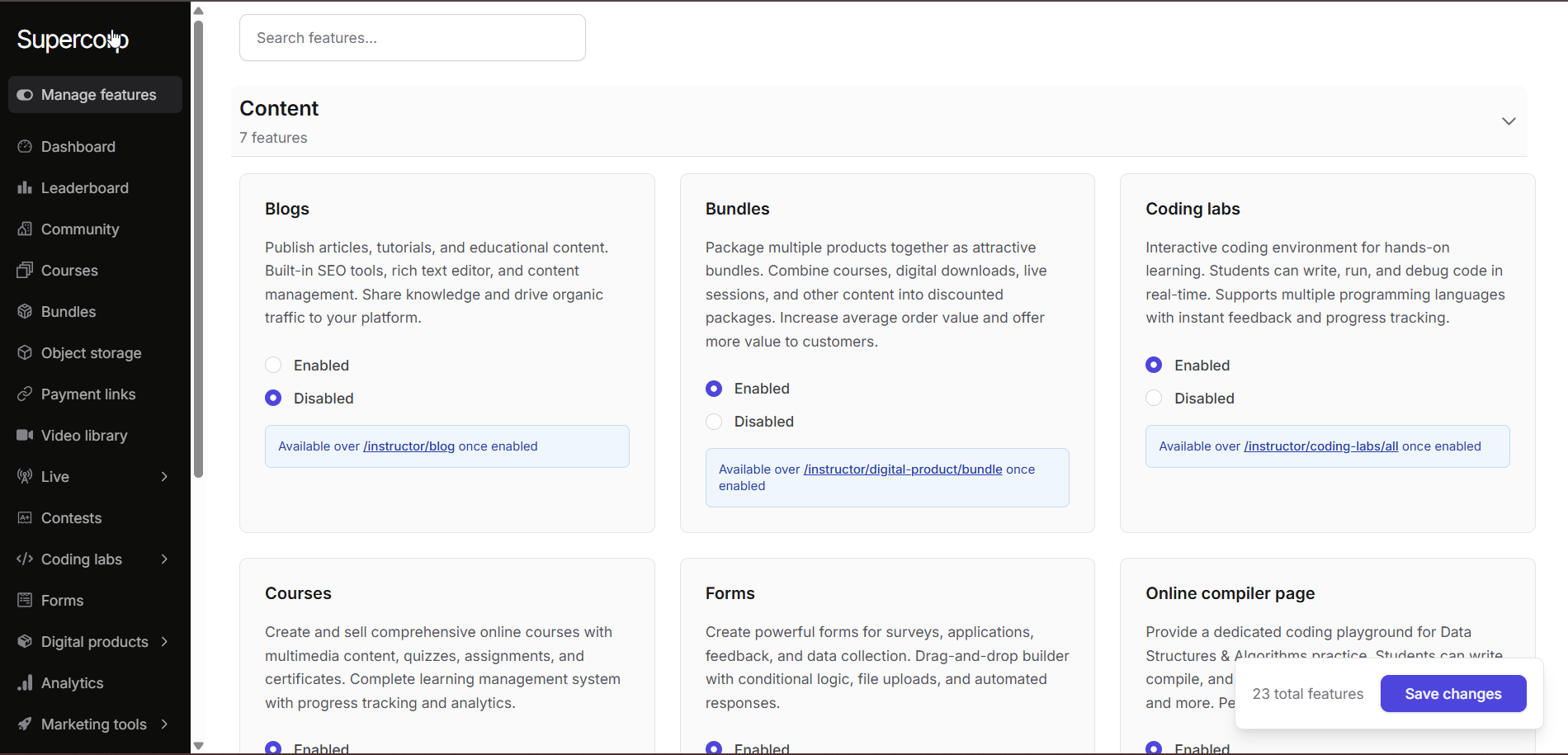
This allows you to enable or disable key modules of your account based on your needs.\
For example, you can turn on [bundles](/setting-up-course/bundle), enable [live classes](/live-classes/what-are-live-classes), activate [coding labs](/creating-coding-labs/what-are-coding-labs), or experiment with [forms](/forms/introduction).
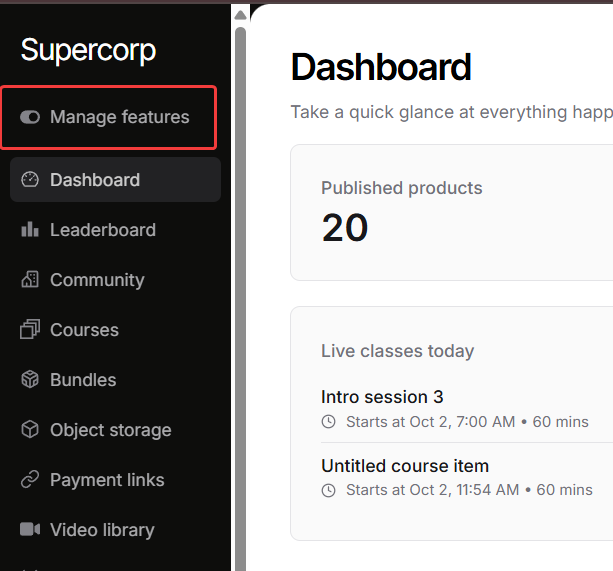
By selecting the features you want, your dashboard stays focused on the tools you actually use, while still giving you the flexibility to expand later as your requirements grow.
Click on **Save Changes** to apply your customizations.
Your **Fermion account** is now ready to go.
With your dashboard live, features enabled, and branding in place, you can immediately start creating courses, running live sessions, and engaging with learners.
To make the most of your new account, check out the [Platform Resources](/onboarding/platform-resources) and watch the [Demo Video](https://www.youtube.com/watch?v=9b31PJRfuqc) for a walkthrough of the key features.
***
Here are some of the most common questions we receive about setting up your account on Fermion:
## Account setup FAQs
Our team will create your account with initial login credentials and a platform URL.
Details will be shared via WhatsApp. We recommend watching the [Demo Video](https://www.youtube.com/watch?v=9b31PJRfuqc) to get started quickly.
Once you join Fermion, your account is usually set up within 30 minutes by the Fermion team. You will receive your login credentials and access details via a WhatsApp channel.
No technical expertise is required. Fermion is designed to be intuitive and user-friendly for creators of all levels.
Trial accounts can be requested by booking a demo at [Fermion - schedule a demo](https://fermion.app/schedule-a-demo). We’ll guide you through the process to get started quickly.
Trial accounts are valid for **7 days** from the time of activation.
Available for customers on a paid plan, our team will help set up your custom sub-domain.
The process typically takes 30–40 minutes depending on DNS verification by your domain provider, after which your LMS will be live with your branding.
Follow our [Course Setup Guide](/setting-up-course/prerequisites) for step-by-step instructions, check [Course FAQs]() for common questions, and refer to [Setup Pricing](/setup-pricing/fixed-pricing-plan) to configure your course pricing.
Detailed documentation regarding payouts can be accessed here: [How do you get Paid?](/manage-settings/manage-payouts)
You can contact our support team directly at [support@codedamn.com](mailto:support@codedamn.com) for any questions or assistance.
Yes, trial accounts allow you to collect payments and run live sessions, but usage is limited. We recommend moving to a paid plan for the best experience.
No, Fermion does not provide custom web design or development services. Our platform is ready-to-use and doesn’t require coding.
We do offer the ability to add custom CSS for certain elements and complete whitelabeling when it comes to branding.
Yes! Fermion offers an on-demand custom native mobile apps. For more information, check our [Pricing](https://fermion.app/pricing) page.
***