> ## Documentation Index
> Fetch the complete documentation index at: https://docs.fermion.app/llms.txt
> Use this file to discover all available pages before exploring further.
# Partial payment dashboard
> Track and manage partial payment collections, monitor student installment plans, and view payment trends over time.
The Partial payment dashboard provides a comprehensive view of your installment payment collections. It helps you track students on payment plans, monitor collection trends, and identify overdue payments at a glance.
## Accessing the Partial payment dashboard
Follow these steps to access the Partial payment dashboard:
After logging in to your school, navigate to your **Instructor dashboard**.
In the sidebar menu, scroll down to the **Billing and earnings** section.
Select **Earnings** to open your earnings dashboard.
Click on the **Partial payments** tab to view the partial payment dashboard.

***
## Summary overview
The top section of the Partial payment dashboard displays key metrics and collection information:
### Total students
Shows the total number of students enrolled in partial payment plans, with a breakdown of their payment status:
* **Active**: Students with upcoming installments
* **Completed**: Students who have finished all their payments
* **Overdue**: Students with missed payment deadlines
Example: `9 total students: 5 active, 1 completed, 3 overdue`
### Collection in range
Displays the total amount collected within a selected date range. This helps you track revenue from partial payments over specific periods.
* **Amount**: The total collection amount (e.g., `₹31,175`)
* **Date range**: The period for which collections are calculated (e.g., `Nov 4 - Dec 4, 2025`)
### Chart date range
Allows you to select a custom date range for viewing collection trends. Use the calendar icon to adjust the period shown in the Collections Overview chart.

***
## Collections overview chart
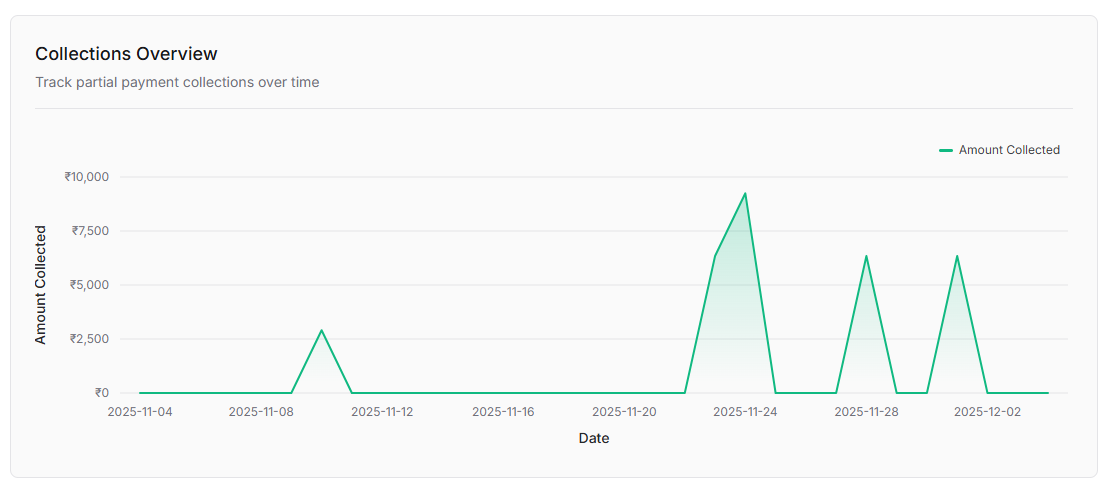
The Collections overview chart provides a visual representation of your partial payment collections over time.
**Purpose**: Track partial payment collections over time
The chart displays:
* **Y-axis (Amount Collected)**: Shows the collection amount, typically ranging from ₹0 to ₹10,000 with increments
* **X-axis (Date)**: Displays the timeline with date labels
* **Line Graph**: A green line with shaded area below showing the amount collected on each date
***
## Partial payment students table
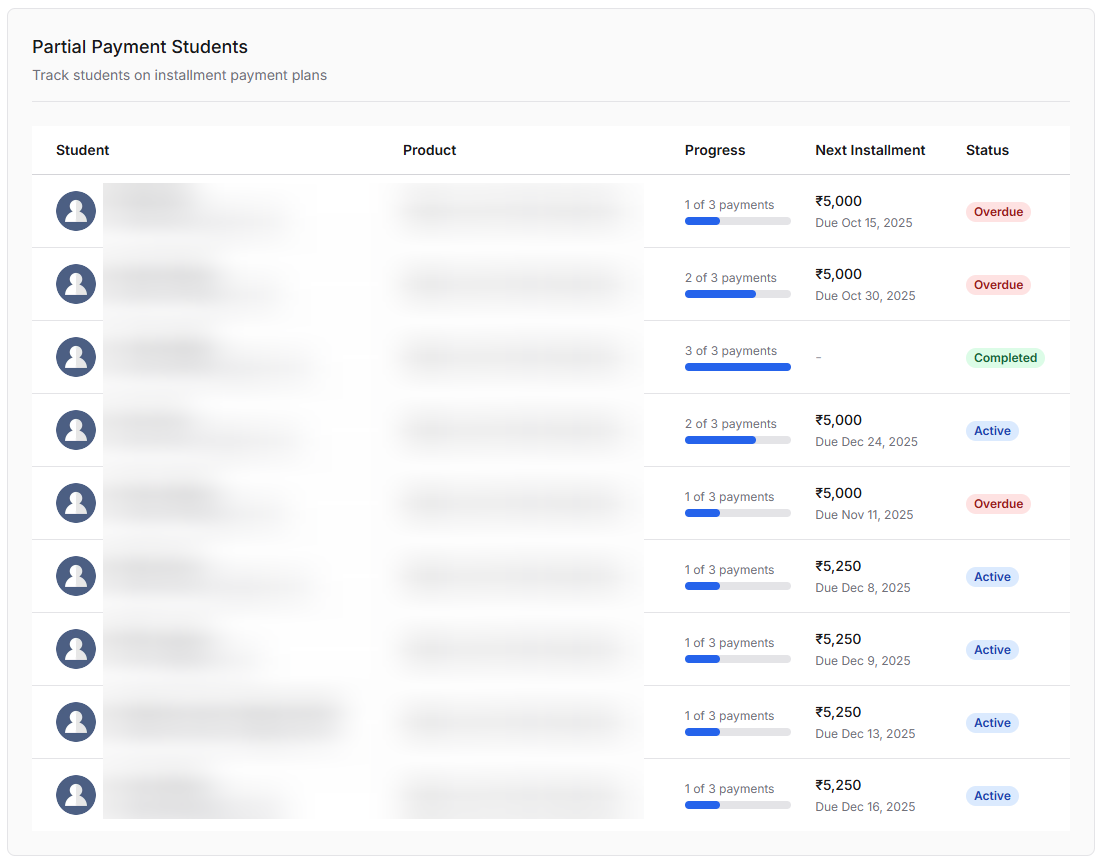
The Partial payment students table provides detailed information about each student enrolled in an installment payment plan.
### Table Columns
| Column | Description |
| -------------------- | ------------------------------------------------------------------------------- |
| **Student** | The name and profile of the student enrolled in the payment plan |
| **Product** | The course, bundle, or digital product purchased through installments |
| **Progress** | Shows the payment progress (e.g., "1 of 3 payments") with a visual progress bar |
| **Next Installment** | The amount and due date of the next payment (e.g., "₹5,000 Due Oct 15, 2025") |
| **Status** | Current payment status: **Active**, **Overdue**, or **Completed** |
### Payment status types
* **Active** (Blue badge): Student has upcoming installments that are not yet due
* **Overdue** (Red badge): Student has missed a payment deadline
* **Completed** (Green badge): Student has successfully completed all installments
Students with **Overdue** status require immediate attention. Consider sending payment reminders or reaching out to help them complete their payments.
### Understanding progress
The progress indicator shows:
* **Current payment number**: Which installment the student is on (e.g., "1 of 3")
* **Visual progress bar**: A blue bar that fills based on completion percentage
* **Total installments**: The total number of payments in the plan