> ## Documentation Index
> Fetch the complete documentation index at: https://docs.fermion.app/llms.txt
> Use this file to discover all available pages before exploring further.
# Pin a Tile
> Learn how to pin a participant’s video tile during a live session to keep all students focused on the same content.
During [live sessions](/live-classes/what-are-live-classes), instructors can pin a specific participant's tile to ensure all students view the same content simultaneously. This feature is particularly useful when you want to highlight a specific speaker, demonstration, or presentation to the entire class.
## How tiles work
When you pin a tile, it becomes the primary focus for all participants in the live session, overriding their individual view preferences. This ensures everyone stays synchronized and focused on the same content, making it ideal for scenarios like guest lectures, student presentations, or when demonstrating specific concepts.
## Pinning a tile
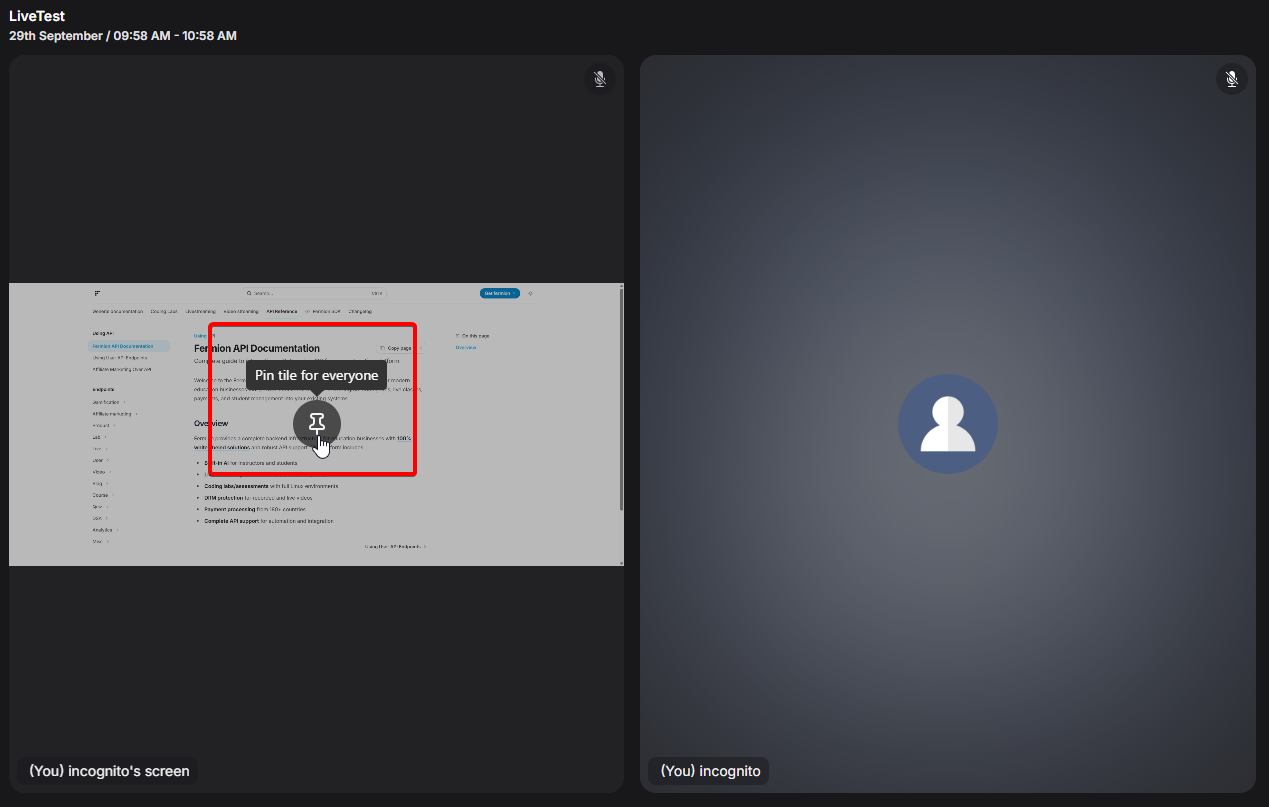
To pin a tile during a live session, simply hover over the participant's video tile and click the pin icon. The pinned view will immediately apply to all students in the session. You can unpin at any time to return control of the view to individual students.
Only **meeting hosts** have the ability to pin and unpin a participant's tile. This ensures that
the session remains organized and all students are focused on the intended content without
conflicting views from other participants.
## Stage management
This feature works seamlessly with Fermion's [stage](/live-classes/invite-to-stage) management capabilities, allowing you to create a more structured and engaging learning experience for your students.
## Next steps
{' '}
Learn how to enable real-time communication during live sessions, engage students with
interactive messaging, file sharing, and polls.
{' '}
Discover how to automatically generate transcripts and record live sessions for easy reference,
accessibility, and improved learner engagement.