> ## Documentation Index
> Fetch the complete documentation index at: https://docs.fermion.app/llms.txt
> Use this file to discover all available pages before exploring further.
# Introduction
> Learn about using APIs to execute DSA coding labs
The DSA Coding Lab Execution API allows you to programmatically execute code submissions and retrieve results for Data Structures and Algorithms (DSA) problems. This API supports batch operations for efficiency and handles multiple programming languages.
## Overview
The API provides four main endpoints which you can utilize to execute DSA coding labs over Fermion API.
Submit a single code execution request.
Retrieve the result of a single code execution.
Submit multiple code execution requests in one batch.
Retrieve results of multiple code executions submitted in a batch.
## Prerequisites
Before you begin using the DSA Execution API, make sure you’ve set up the following essential components.
You must have a valid Fermion API key to run these coding labs. Create a Fermion account and go to **Settings → API access** in your instructor dashboard to get the key.\
Learn how to get your [API key here](/api-guide/introduction#how-to-get-your-api-key).
#### Base64URL Encoded source code
Base64URL encoding is **critical** for proper API usage.\
The DSA execution API requires Base64URL encoding (not standard Base64) for several fields including **source code**, **expected output**, **stdin input**, and **file attachments** for [SQL labs](/creating-io-coding-labs/sql-over-api).
Base64URL encoding is a URL-safe variant of the standard Base64 format. It’s designed to ensure that encoded data can be safely transmitted in URLs, JSON, and APIs without introducing reserved or invalid characters.
Base64URL encoding is a URL-safe variant of Base64 that:
* Replaces `+` with `-` (dash)
* Replaces `/` with `_` (underscore)
* Removes padding `=` characters
* Ensures the encoded string is safe for use in URLs and JSON
Using standard Base64 encoding instead of Base64URL will cause API errors or
unexpected behavior. Always use Base64URL encoding for the API. Learn more about [Base64URL encoding](https://b64encode.com/blog/base64url-guide/)
## Supported languages
Fermion currently supports the following runtimes for code execution:
Each language runs in a secure, isolated container with seperate resources.
## How to execute IO/DSA labs over API?
You can utilize the following steps to execute DSA over API. If you wish to test how a request is structured for any given language, head over to the [compile API](/creating-io-coding-labs/api-usage#how-does-compile-api-work%3F) section of this documentation to learn more.
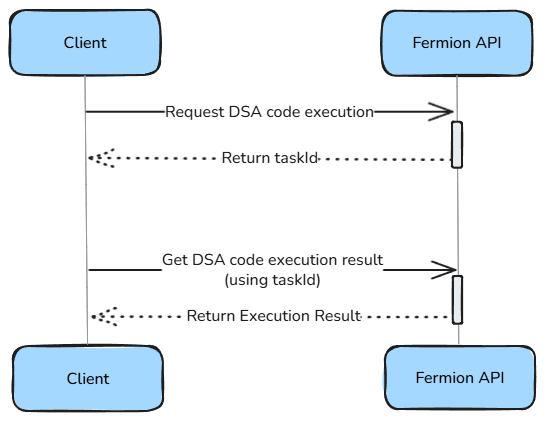
Use the **Request DSA code execution \[batch]** endpoint to submit one or more code executions.
For detailed API specification, request/response schemas, and interactive examples, see the official API documentation: [Request DSA code execution \[batch\]](https://docs.fermion.app/api-reference/dsa/request-dsa-code-execution-\[batch])
Here is an empty sample request body for executing C code over API. Head over to the [runConfig documentation](/creating-io-coding-labs/api-usage#run-configuration-runconfig) to know more about each field
```json theme={null}
{
"data": [
{
"data": {
"entries": [
{
"language": "C",
"runConfig": {
"customMatcherToUseForExpectedOutput": "ExactMatch",
"expectedOutputAsBase64UrlEncoded": "",
"stdinStringAsBase64UrlEncoded": "",
"callbackUrlOnExecutionCompletion": "",
"shouldEnablePerProcessAndThreadCpuTimeLimit": false,
"shouldEnablePerProcessAndThreadMemoryLimit": false,
"shouldAllowInternetAccess": false,
"compilerFlagString": "",
"maxFileSizeInKilobytesFilesCreatedOrModified": 51200,
"stackSizeLimitInKilobytes": 65536,
"cpuTimeLimitInMilliseconds": 2000,
"wallTimeLimitInMilliseconds": 5000,
"memoryLimitInKilobyte": 512000,
"maxProcessesAndOrThreads": 60
},
"sourceCodeAsBase64UrlEncoded": "",
"additionalFilesAsZip": {
"type": "base64url-encoding",
"base64UrlEncodedZip": ""
}
}
]
}
}
]
}
```
The API returns an array of task IDs in the same order of challenges that you submitted, that you can use to retrieve results later.
```json theme={null}
{
"output":
{
"status": "ok",
"data":
{
"taskIds": [ ""]
}
}
}
```
Use the **[Get DSA code execution result \[batch\]](/api-reference/dsa/get-dsa-code-execution-result-\[batch])** endpoint to retrieve results of submitted executions. You will have to pass the Fermion API key so that we can authenticate your request
Here's a sample cURL request to get the execution results of the task IDs returned from the previous endpoint
```bash theme={null}
curl --request POST \
--url https://backend.codedamn.com/api/public/get-dsa-code-execution-result-batch \
--header 'Content-Type: application/json' \
--header 'FERMION-API-KEY: ' \
--data '{
"data": [
{
"data": {
"taskUniqueIds": [
""
]
}
}
]
}
```
For detailed API specification, request/response schemas, and interactive examples, see the official API documentation: [Get DSA code execution result \[batch\]](https://docs.fermion.app/api-reference/dsa/get-dsa-code-execution-result-\[batch])
***
## Request DSA code execution
The request to the [Request DSA code execution](/api-reference/dsa/request-dsa-code-execution-\[single]) endpoint contains a **language field**, **runConfig** object, source code as base64URL encoded, and additional files if we are executing [SQL over API](/creating-io-coding-labs/sql-over-api)
Here is a description of these fields to be provided while sending a request.
### Run Configuration (runConfig)
The runConfig object defines execution parameters and resource limits for each code run. These settings control performance, safety, and sandbox behavior during code execution.
| Field Name | Description |
| ---------------------------------------------- | ----------------------------------------------------------------------------------------------------- |
| `customMatcherToUseForExpectedOutput` | Defines how program output is compared with the expected output. Common options include `ExactMatch`. |
| `expectedOutputAsBase64UrlEncoded` | Base64URL-encoded expected output string. |
| `stdinStringAsBase64UrlEncoded` | Base64URL-encoded standard input string for the program. |
| `callbackUrlOnExecutionCompletion` | Optional webhook URL that receives a callback once execution completes. |
| `shouldEnablePerProcessAndThreadCpuTimeLimit` | Enables CPU time limits per process/thread if set to `true`. |
| `shouldEnablePerProcessAndThreadMemoryLimit` | Enables memory limits per process/thread if set to `true`. |
| `shouldAllowInternetAccess` | Allows or restricts outbound internet access for the running code. |
| `compilerFlagString` | Optional compiler flags or arguments to use during code compilation. |
| `maxFileSizeInKilobytesFilesCreatedOrModified` | Maximum allowed size (in KB) for any file created or modified during execution. *(Default: 51200)* |
| `stackSizeLimitInKilobytes` | Maximum stack size (in KB) allocated for the program. *(Default: 65536)* |
| `cpuTimeLimitInMilliseconds` | Maximum CPU time (in ms) the program can use. *(Default: 2000)* |
| `wallTimeLimitInMilliseconds` | Maximum total wall time (in ms) allowed for execution. *(Default: 5000)* |
| `memoryLimitInKilobyte` | Maximum total memory (in KB) that the program may consume. *(Default: 512000)* |
| `maxProcessesAndOrThreads` | Maximum number of processes and/or threads the program can spawn. *(Default: 60)* |
### Required Fields
The following fields **must** be Base64URL encoded and sent as part of the request body:
| Field Name | Description |
| ---------------------------------- | --------------------------------------------------------------------------------- |
| `sourceCodeAsBase64UrlEncoded` | Your source code |
| `expectedOutputAsBase64UrlEncoded` | Expected program output, API will judge the program output in accordance to this. |
| `stdinStringAsBase64UrlEncoded` | Input data for the program |
| `base64UrlEncodedZip` | ZIP file contents for SQLite |
The response from this API provides us with `taskId` which we can use to get the result from the [Get DSA code execution result](/api-reference/dsa/get-dsa-code-execution-result-\[batch]) endpoint
## Get DSA code execution result
After we have received the `taskId` from the previous endpoint, we can send this task ID to the [Get DSA code execution result](/api-reference/dsa/get-dsa-code-execution-result-\[single]) and get the execution result. The API returns a `taskUniqueId`, `language` and the `runConfig` provided at the time of request. Apart from this, the response has `codingTaskStatus` which tells us if the code has been executed or not, a `runResult` object which tells us about the execution of the code.
### codingTaskStatus Values
Each submitted coding task in Fermion's DSA execution API has a `codingTaskStatus` that indicates its current stage of processing. The `codingTaskStatus` can have the following values:
| Status | Description |
| ---------------- | -------------------------------- |
| **`Pending`** | Task is queued for execution |
| **`Processing`** | Task is currently being executed |
| **`Finished`** | Task execution completed |
### runResult object
The runResult object contains information regarding the execution of the code and the program data after the code execution. The following fields are part of the runResult object.
| Field | Description |
| ------------------------------------------------ | ------------------------------------------------------------------------ |
| `compilerOutputAfterCompilationBase64UrlEncoded` | Base64-encoded compiler output. |
| `finishedAt` | Timestamp representing when the execution finished. |
| `runStatus` | Status of the code run e.g., `successful`, `compilation-error`, |
| `programRunData.cpuTimeUsedInMilliseconds` | CPU time consumed by the program (in milliseconds). |
| `programRunData.wallTimeUsedInMilliseconds` | Total elapsed (wall) time for execution (in milliseconds). |
| `programRunData.memoryUsedInKilobyte` | Memory used by the program (in kilobytes). |
| `programRunData.exitSignal` | Signal number if the program was terminated by the system. |
| `programRunData.exitCode` | Exit code returned by the program after execution. |
| `programRunData.stdoutBase64UrlEncoded` | Base64-encoded standard output (stdout) from the executed program. |
| `programRunData.stderrBase64UrlEncoded` | Base64-encoded standard error (stderr) output from the executed program. |
### runStatus Values
The `runStatus` field inside runResult provides detailed feedback about the outcome of code execution. The `runStatus` field can have the following values:
| Status | Description |
| ---------------------------- | ------------------------------------ |
| **`successful`** | Code executed successfully |
| **`compilation-error`** | Code failed to compile |
| **`time-limit-exceeded`** | Execution exceeded time limit |
| **`wrong-answer`** | Output doesn't match expected result |
| **`non-zero-exit-code`** | Program exited with non-zero code |
| **`died-sigsev`** | Segmentation fault |
| **`died-sigxfsz`** | File size limit exceeded |
| **`died-sigfpe`** | Floating point exception |
| **`died-sigabrt`** | Program aborted |
| **`internal-isolate-error`** | Internal system error |
| **`unknown`** | Unknown error occurred |
This was an example flow for single DSA code execution request. The same flow can be followed for batch execution of codes using the batch endpoints.
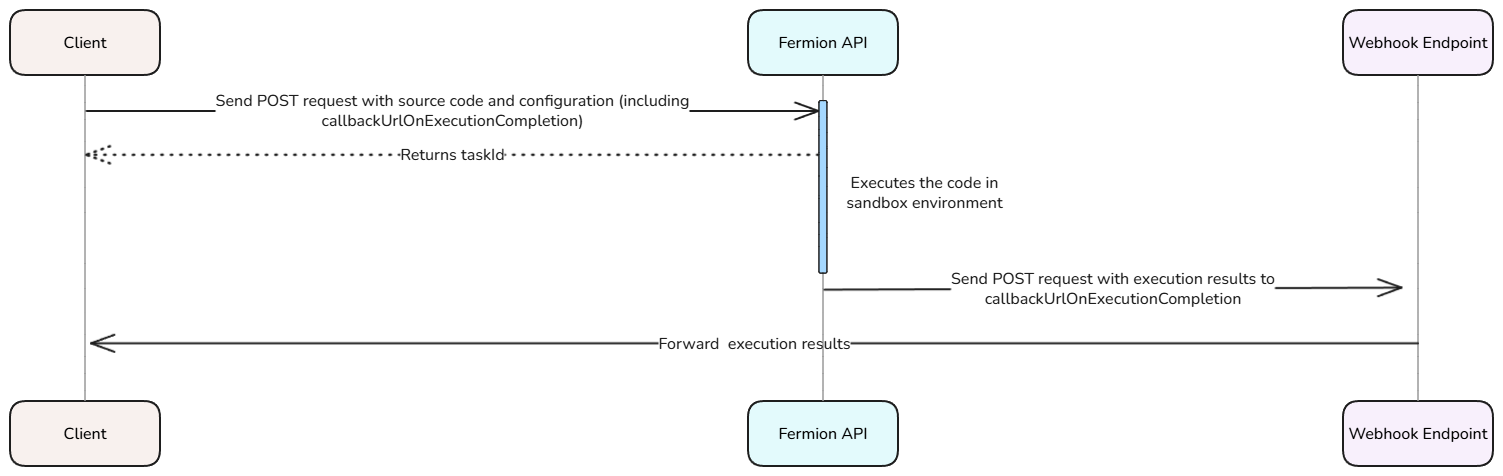
## Using webhook URLs for instant results (recommended)
Instead of polling for results, it's recommended to use the`callbackUrlOnExecutionCompletion` parameter in your `runConfig`. This
webhook URL will receive a POST request with the execution results immediately when processing completes, eliminating the need for repeated
polling and providing faster response times.
When using webhook URLs, include the `callbackUrlOnExecutionCompletion` in
your execution request
```json theme={null}
{
"language": "Python",
"sourceCodeAsBase64UrlEncoded": "cHJpbnQoImhlbGxvIHdvcmxkIik=",
"runConfig": {
"callbackUrlOnExecutionCompletion": "https://your-domain.com/webhook/execution-complete",
"customMatcherToUseForExpectedOutput": "ExactMatch",
"expectedOutputAsBase64UrlEncoded": "aGVsbG8gd29ybGQK",
"cpuTimeLimitInMilliseconds": 2000,
"wallTimeLimitInMilliseconds": 5000,
"memoryLimitInKilobyte": 131072
}
}
```
Your webhook endpoint will receive the complete execution result as a POST request body, containing the same data structure as the batch result API response.
***
The **Compile API** allows you to execute arbitrary code in a secure, sandboxed environment directly through Fermion’s backend. This is ideal for online coding exercises, testing snippets, or building coding playgrounds on your platform.
You can send a POST request with your source code and configuration details, and the API returns the program’s output, error messages, and execution metadata, right inside your instructor dashboard.
Before you start, make sure **Coding labs** are enabled under **Manage Features** in your instructor dashboard. Learn how to enable features at Fermion [here](/manage-settings/manage-features)
***
## How does compile API work?
We discussed how we can execute DSA / IO codes over API in the previous sections. You can test how a request body would look like right inside your Fermion instructor dashboard with the help of the following steps.
You can access compile API tab directly inside your instructor dashboard by heading over to **Coding labs** → **Compile API**.
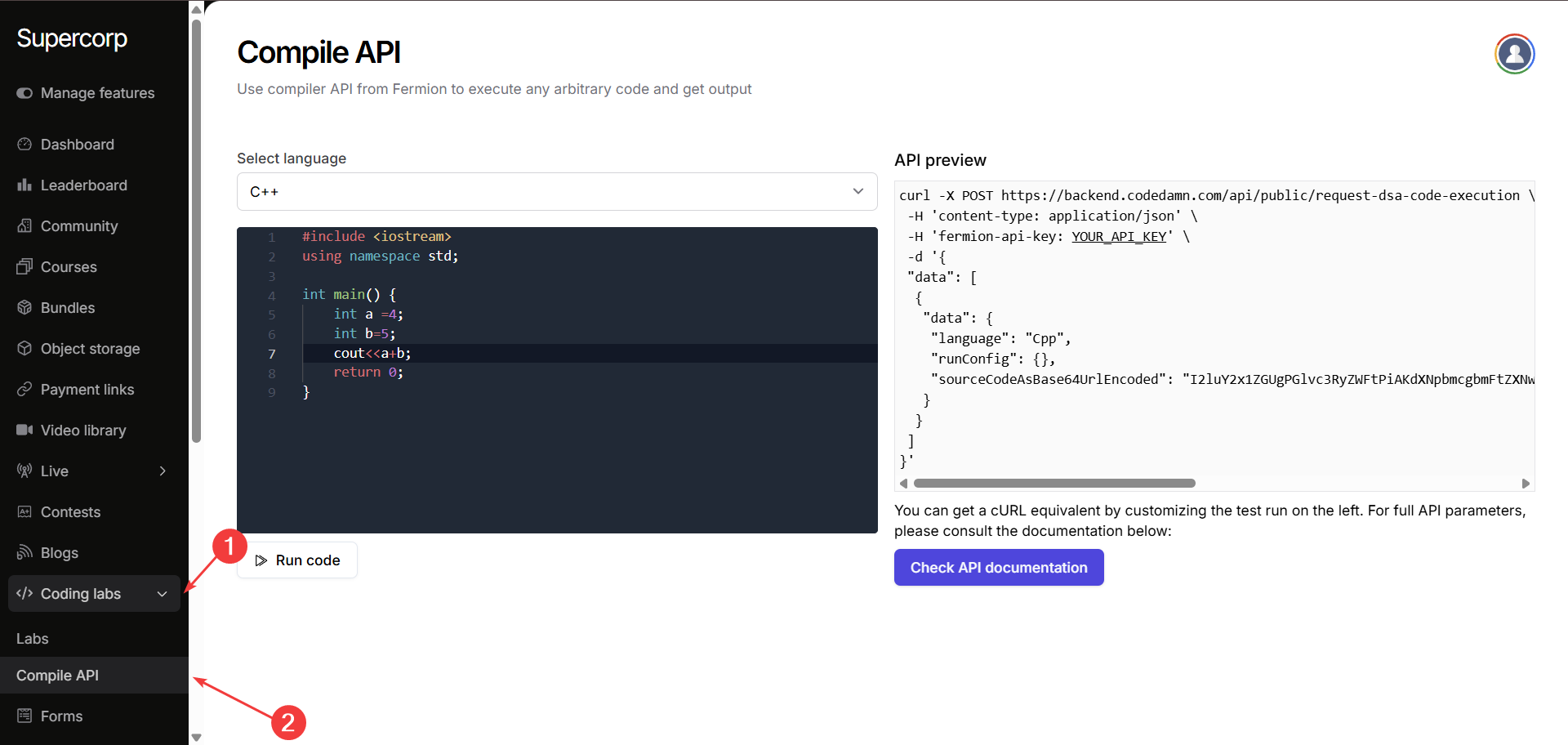
Select the language you want to test the compile API for. After accessing this section, you will be presented with the following two panes:
On the left side, you can write and edit your source code in the built-in editor using any of the supported languages.
Simply choose the language from the dropdown and click **Run code** to execute it securely in Fermion’s sandboxed environment.
On the right side, you can view the automatically generated **cURL request**: showing exactly how to call the Fermion Compile API programmatically. As you can see the source code is Base64URL encoded inside the request body.
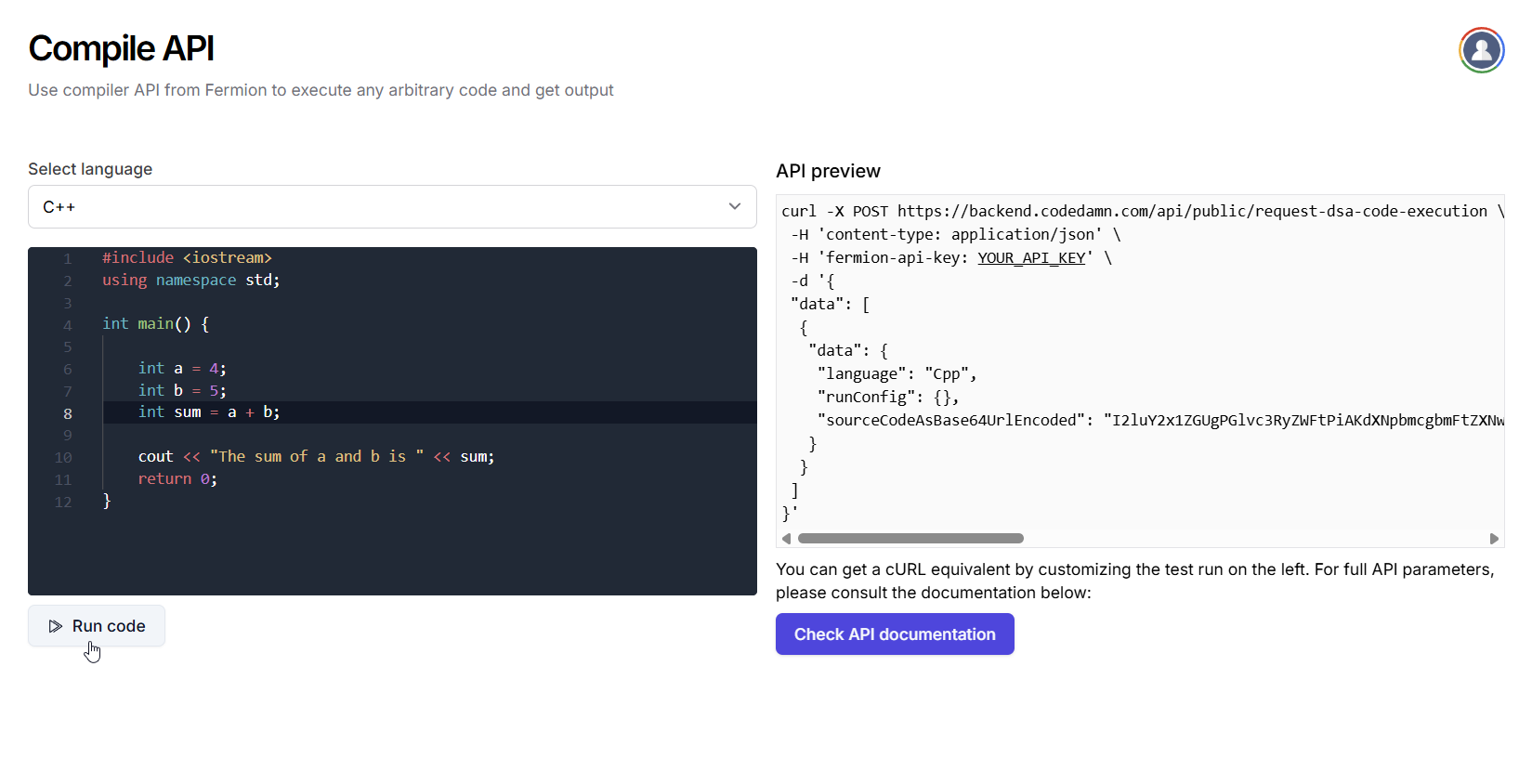
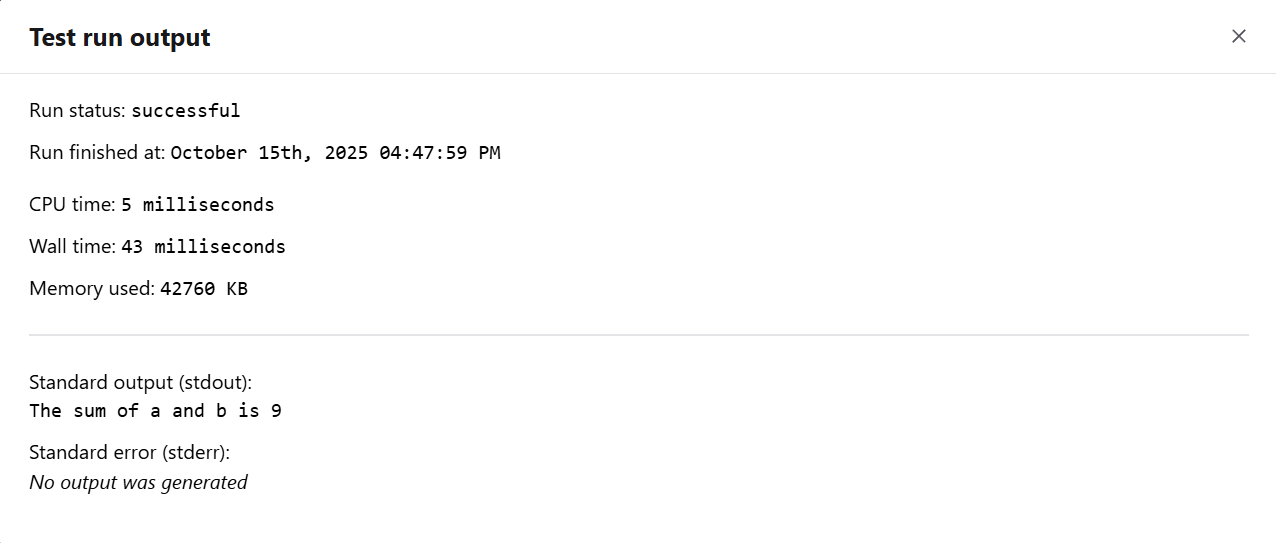
After clicking **Run code**, you will see the execution results, including status, timing, memory usage, and program output. Example:
## Industry Pricing Comparison
Fermion offers the best infrastructure and extremely competitive prices compared to industry standards. For example, consider Judge0's pricing on RapidAPI vs Fermion's base plan pricing.
| Platform | Cost per Submission | Rate limits |
| ------------------- | ------------------------- | -------------------------- |
| **Judge0** | \$1 per 1,000 submissions | Unknown |
| **Fermion DSA API** | \$1 per 5,000 submissions | 10,000 requests per second |
Planning to execute more than 1 million runs per month? Contact our
team at [support@codedamn.com](mailto:support@codedamn.com) for special enterprise pricing and higher rate limits.
**Why Choose Fermion over Judge0?**
* **Better Performance**: Optimized specifically for DSA problems
* **Batch Operations**: Execute multiple problems in a single API call
* **Enterprise Support**: Dedicated support for high-volume users
* **Competitive Pricing**: Better rates for volume usage
Fermion's DSA execution API is a production-ready, enterprise-grade
replacement for Judge0 with better performance, reliability, and pricing.