> ## Documentation Index
> Fetch the complete documentation index at: https://docs.fermion.app/llms.txt
> Use this file to discover all available pages before exploring further.
# Fermion API Documentation
> Complete guide to integrating with Fermion API for your education platform
Welcome to the Fermion API documentation. Fermion is an AI-native platform for modern education businesses that provides comprehensive APIs to integrate coding labs, live classes, payments, and student management into your existing systems.
## Overview
Fermion provides a complete backend infrastructure for education businesses with [100% whitelabeled solutions](https://fermion.app/) and robust API support. The platform includes:
* **Built-in AI** for instructors and students
* **[Live-streaming infrastructure](/live-classes/what-are-live-classes)** (no Zoom required)
* **[Coding labs/assessments](/creating-coding-labs/what-are-coding-labs)** with full Linux environments
* **[DRM protection](/live-classes/drm-and-watermarking)** for recorded and live videos
* **Payment processing** from 180+ countries
* **[Complete API support](/api-guide/using-user-endpoints)** for automation and integration
## How to get your API key
An **API Key** is a unique identifier that allows you to authenticate and securely connect your applications with Fermion's APIs. It ensures that only authorized users or systems can access your platform’s data and perform actions such as managing [courses](/setting-up-course/prerequisites), [live classes](/live-classes/what-are-live-classes), [coding labs](/creating-coding-labs/what-are-coding-labs) or retrieving user information. By using an API key, you can safely integrate Fermion’s backend functionality into your own systems and automate tasks without exposing your account credentials.
You can get your Fermion API key with the following steps:
Head over to **Settings** in your Instructor dashboard sidebar and click on **API Access**.
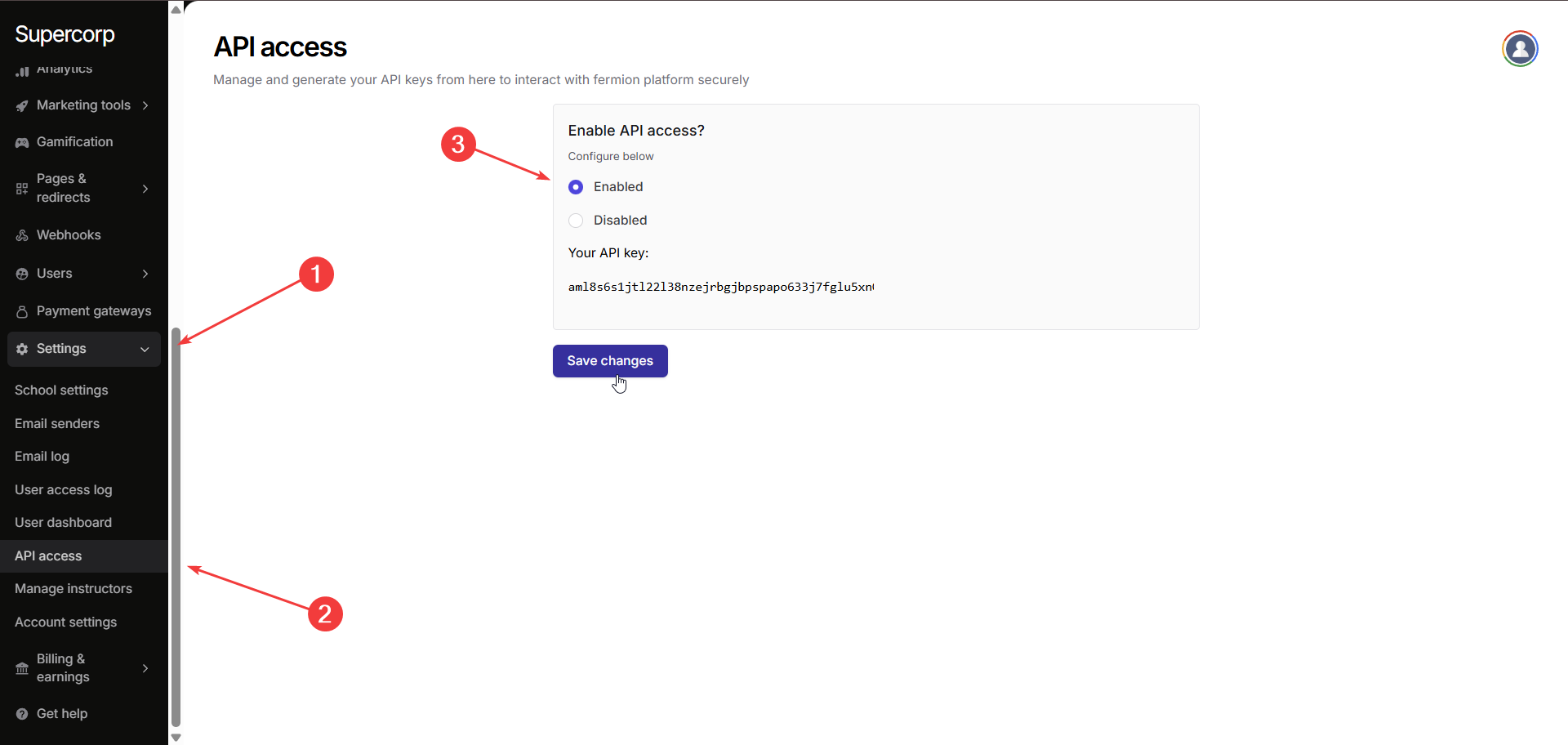
Toggle **Enabled** in **'Enable API access?'** section and click on **Save changes** to activate API functionality for your school.
Once API access is enabled, your unique **API Key** will be displayed. Copy this key and use it in your integrations to authenticate API requests.
Keep your API key secure and do not share it publicly. The API key is tied to your account and can be used to access sensitive data through the Fermion API.